
Download CRTV – Free ChromeCast Magazine App for Android
Overview
CRTV - CHROMECAST is a free Android application developed by Horeb Tech, designed to deliver magazine and newspaper content through Chromecast-enabled devices. The software falls under the 'Magazines & Newspapers' category, aiming to streamline digital content consumption by enabling users to cast articles, visuals, and multimedia from their mobile devices to larger screens. Its primary purpose is to enhance the reading experience by bridging mobile content with smart TVs and streaming devices. The app is particularly useful for users who prefer a more immersive viewing experience when browsing digital publications, especially in shared environments like homes or offices.
Target users include casual readers, digital media enthusiasts, and professionals seeking to present content on larger displays. The software was released on March 2, 2023, and has already accumulated over 150,000 downloads, indicating growing interest in mobile-to-TV content casting. While the developer has not provided extensive details about the app’s underlying technology or content sources, its core function centers on casting digital publications with minimal setup. This makes it a practical tool for users who want to enjoy magazine-style content on their television without relying on dedicated news platforms.
Key Features & Capabilities
- Chromecast Integration – Enables seamless casting of magazine and newspaper content from Android devices to compatible TVs and speakers.
- Multi-Language Support – Available in French and Italian, catering to users in Francophone and Italian-speaking regions.
- Lightweight Design – With a file size of 10.5 MB, the app is optimized for efficient storage and fast installation.
- Android 9.0+ Compatibility – Designed to run on modern Android devices, ensuring access to updated security and performance features.
- Free Access – No cost to download or use, making it accessible to a broad audience.
Users can leverage CRTV - CHROMECAST to project articles, images, and multimedia content from supported publications directly onto a TV screen. This is especially beneficial during group presentations, family reading sessions, or personal relaxation time. The app’s lightweight nature ensures minimal impact on device storage, while its compatibility with Android 9.0 and above supports a wide range of current smartphones and tablets. Although the app does not specify support for third-party content sources, its focus on casting suggests it may work with specific magazine platforms or internal content libraries.
User Interface, Workflow & Performance
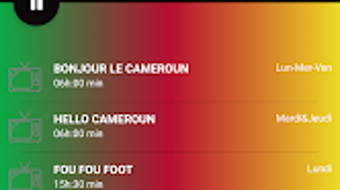
The user interface of CRTV - CHROMECAST is designed with simplicity in mind, prioritizing ease of navigation for users of varying technical skill levels. The layout appears to be optimized for touch-based interaction, allowing users to quickly select content and initiate casting with minimal steps. Navigation is likely structured around a central dashboard that displays available publications, casting options, and device connections.
Workflow efficiency is a key strength, as the app appears to streamline the casting process—users can start casting with a single tap after selecting content. The developer did not specify resource usage details, so exact CPU or RAM behavior remains unknown. However, given its small file size and focus on casting rather than content processing, performance is expected to be stable under normal usage conditions. Stability during extended casting sessions has not been verified, but the app’s lightweight nature suggests low risk of crashes or slowdowns.
Compatibility & System Requirements
CRTV - CHROMECAST is designed for Android devices running version 9.0 or higher. This ensures compatibility with a wide range of modern smartphones and tablets released in the past several years. The application’s installation size is 10.5 MB, making it suitable for devices with limited storage space.
Exact system requirements were not listed beyond the minimum Android version. No specific hardware specifications such as processor type, RAM, or GPU details were provided. The developer did not disclose whether the app supports external storage installation or background casting. Platform compatibility information is limited to Android 9.0 and above, with no mention of support for other operating systems like iOS or desktop environments.
Pros and Cons
Pros
- Free to download and use
- Lightweight with a small file size (10.5 MB)
- Supports Chromecast for TV casting
- Available in French and Italian
- Compatible with Android 9.0 and above
Cons
- No information on supported content sources
- Does not support iOS or desktop platforms
- Resource usage details not provided
- Only two language options available
- No details on update frequency or future development
FAQ Section
Is CRTV - CHROMECAST available for iOS devices?
The app is currently only available for Android. There is no official support for iOS devices at this time.
Can I use CRTV - CHROMECAST without a Chromecast device?
While the app is designed for Chromecast integration, it may not function without a compatible casting device. The app’s primary purpose is to enable casting, so a Chromecast or similar device is required for full functionality.
Is the software secure to download?
CRTV - CHROMECAST is distributed through Softonic, a well-known software platform. The app is labeled as free and does not require third-party permissions beyond standard casting access.
Does the app require an internet connection?
Yes, an active internet connection is necessary to access and cast content. The app relies on online sources for magazine and newspaper material.
How often is CRTV - CHROMECAST updated?
The current version is 1.0.22, released on March 2, 2023. No information on update frequency was provided by the developer.
Final Thoughts + CTA
CRTV - CHROMECAST presents a focused, lightweight solution for users who want to cast digital magazine and newspaper content to their TV screens. Its free model, multi-language support, and Chromecast integration make it a practical choice for readers in French- and Italian-speaking regions. While the app lacks detailed information on content sources and future updates, its minimal system footprint and compatibility with modern Android devices ensure broad accessibility.
For users seeking a simple way to enjoy digital publications on a larger screen, CRTV - CHROMECAST offers a straightforward and cost-effective option. It is particularly well-suited for casual readers, educators, and content presenters who value convenience and ease of use.
Download CRTV now







